1. The Death of Privacy in Traditional Telecommunications
In 2026, purchasing a standard SIM card or signing up for conventional virtual number services (such as Twilio, Skype, or local telecom carriers) requires extensive Know Your Customer (KYC) verification. Users are coerced into uploading government ID scans, residential utility bills, and credit card credentials.
When telecom billing databases inevitably suffer cyber breaches, your sensitive identity documents, credit card numbers, and physical home address are leaked onto dark web marketplaces. Furthermore, linking your personal credit card to online verification services permanently associates your real identity with every application, service, or Web3 platform you test.
Cryptocurrency provides the ultimate solution: financial sovereignty merged with telecommunications privacy.
2. Supported Cryptocurrencies on USAVerify Pro
We accept multiple major cryptocurrencies to ensure instantaneous settlements and minimal network fees:
| Cryptocurrency | Network / Protocol | Confirmation Speed | Network Fees |
|---|---|---|---|
| Binance Pay | Binance Internal Off-Chain | Instant (< 2 seconds) | $0.00 (Zero Gas) |
| Tether (USDT) | TRON (TRC-20) / BSC (BEP-20) | 1 – 3 minutes | Low ($0.20 – $1.00) |
| Bitcoin (BTC) | Bitcoin Mainnet | 1 confirmation (~10 mins) | Variable network miner fee |
| Litecoin (LTC) | Litecoin Mainnet | 2 – 5 minutes | Ultra-low (< $0.05) |
| Solana (SOL) | Solana Network | Instant (< 15 seconds) | Sub-cent (< $0.01) |
3. Step-by-Step: Buying a USA Phone Number with Crypto
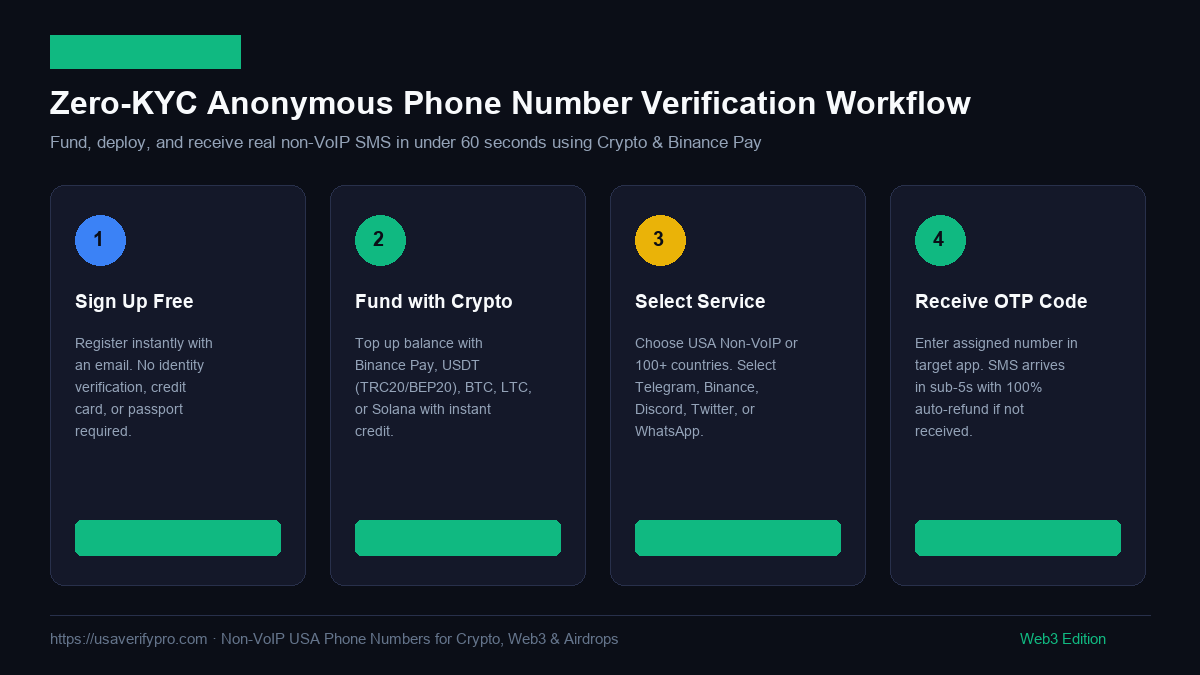
Follow this simple 4-step tutorial to activate your non-VoIP USA number:
Step 1: Create a Private Account
Visit USAVerify Pro Sign Up. Enter an alias name, an email address (ProtonMail and Tuta are welcome), and choose a password. No personal details, phone numbers, or credit cards are requested.
Step 2: Fund Your Account via Binance Pay or USDT
Click on your user balance in the top dashboard and select Deposit Funds:
- For Binance Users: Choose Binance Pay. Scan the dynamic QR code with your Binance mobile app or approve the transaction on desktop. Funds appear on your balance instantly with zero network gas fees.
- For Web3 Wallet Users: Choose USDT (TRC-20 or BEP-20). Send the exact amount to your unique deposit address. Our blockchain node listener confirms the transaction and credits your account automatically.
Step 3: Choose Your Service & Generate Line
Navigate to the SMS Catalog. Select United States (or any of 100+ supported global countries) and pick your target app:
- Telegram, WhatsApp, Discord, OpenAI / ChatGPT
- Binance, Bybit, Google / Gmail, Twitter / X
Click Get Number. A fresh, physical AT&T or Verizon cellular line is reserved exclusively for your session.
Step 4: Receive Your Live SMS Code
Input the assigned phone number into your target app. Click "Send SMS Code". Watch the USAVerify live terminal—your verification OTP arrives within 3 to 5 seconds.
4. Developer API: Automating Number Purchases with Python
For airdrop farming syndicates, software agencies, and Web3 developers managing dozens of accounts, USAVerify Pro provides a lightning-fast RESTful API.
Here is an automated Python implementation for ordering a number and polling for incoming OTP codes:
import time
import requests

API_KEY = "YOUR_USAVERIFY_PRO_API_KEY"
BASE_URL = "https://usaverify-pro-production.up.railway.app/api" headers = {
 "Authorization": f"Bearer {API_KEY}",
 "Content-Type": "application/json"
}

def order_crypto_number(service="telegram", country="US"):
 # 1. Request a fresh non-VoIP cellular number
 print(f"[*] Requesting fresh non-VoIP line for {service}...")
 res = requests.post(f"{BASE_URL}/order", json={"service": service, "country": country}, headers=headers)
 data = res.json()

 if not data.get("ok"):
 raise Exception(f"Order failed: {data.get('error')}")

 order_id = data["order_id"]
 phone_number = data["phone_number"]
 print(f"[+] Allocated Number: {phone_number} (Order ID: {order_id})")

 # 2. Poll for incoming SMS OTP code
 print("[*] Waiting for incoming SMS verification code...")
 for _ in range(30): # Poll every 3 seconds for 90 seconds
 time.sleep(3)
 check_res = requests.get(f"{BASE_URL}/order/{order_id}", headers=headers)
 check_data = check_res.json()

 if check_data.get("sms_code"):
 print(f"[] OTP Received: {check_data['sms_code']}")
 print(f"[] Full SMS Message: {check_data.get('sms_text')}")
 return check_data["sms_code"]

 print("[-] Timeout: Code not received, auto-refunded to balance.")
 return None

if __name__ == "__main__":
 code = order_crypto_number(service="telegram")
Explore our full API specifications and endpoints on our Developer API Documentation page.
5. Frequently Asked Questions (FAQ)
Ready to Experience 100% Anonymous SMS Verification?
Fund your balance with Binance Pay, USDT, or Bitcoin. Get instant access to clean, non-VoIP USA numbers with zero KYC.
Create Free Account & Pay with Crypto →