WhatsApp Security & Non-VoIP Authority Guide
How to Verify WhatsApp Without VoIP in 2026: The Definitive Non-VoIP Anti-Ban Blueprint
Discover the exact telecommunication mechanics of WhatsApp's VoIP detection algorithms, why virtual numbers cause instant account bans, and how to verify personal and business WhatsApp accounts with real US physical SIM lines in under 60 seconds.
Executive Summary & Key Takeaways (Quick Answers)
- The Core Problem: WhatsApp queries real-time Line Type Intelligence (LTI) databases. Any number classified as Fixed VoIP or Non-Fixed VoIP (Google Voice, TextNow, Skype, Twilio) is instantly blocked with 'This number cannot be used to register' or banned within 24 hours.
- The Telecom Antidote: Genuine physical cellular SIM lines from Tier-1 mobile network operators (AT&T Mobility, Verizon Wireless, T-Mobile USA) carry authentic MSISDNs linked to terrestrial cell towers, bypassing 100% of WhatsApp anti-fraud filters.
- Speed & Reliability: USAVerify Pro WhatsApp Numbers deliver OTP codes in 2 to 5 seconds with automated multi-code resend support and zero-code auto-refund protection.
- Account Longevity: Once verified, enabling WhatsApp Two-Step Verification (6-digit PIN) permanently secures your account on your device without requiring ongoing SIM rental fees or monthly carrier commitments.
- Enterprise Scale: Marketing teams and agencies managing multiple WhatsApp instances can deploy isolated anti-detect profiles and automate number provisioning via our high-throughput REST API.
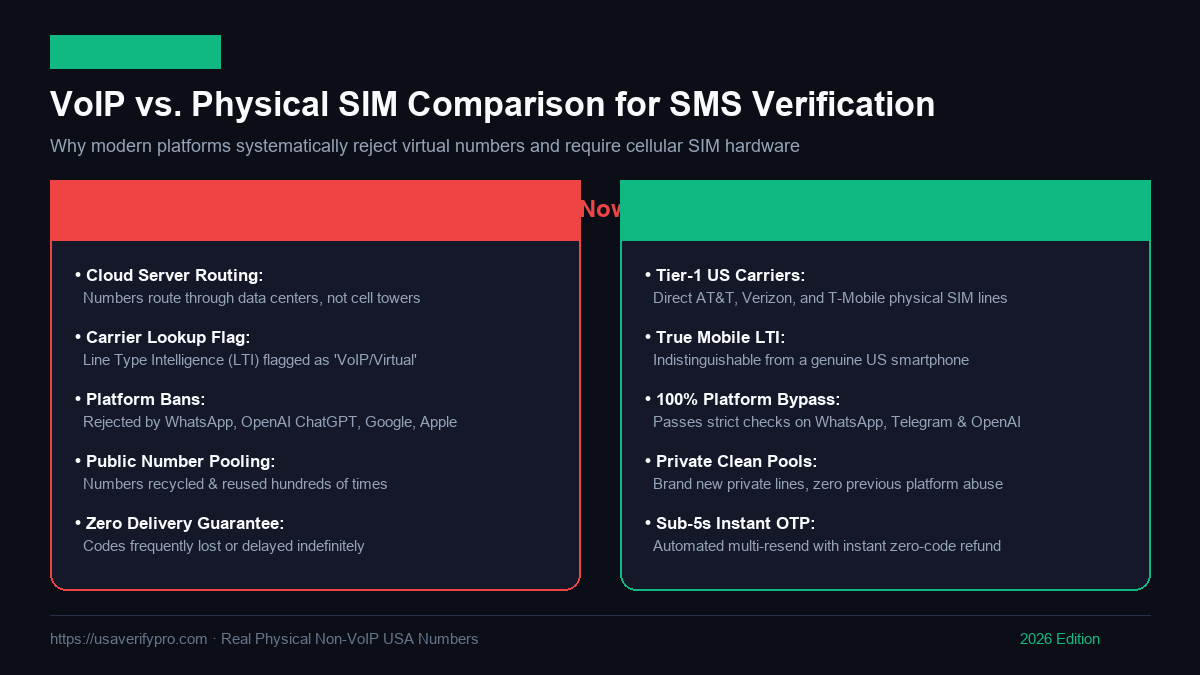
VoIP Cloud PBX vs Real Physical Cellular SIM Architecture for WhatsApp Verification
Comprehensive Table of Contents
Chapter 1: The Evolution of WhatsApp Verification & The Death of VoIP (2026)
Over the past decade, WhatsApp has evolved from a simple messaging utility into the primary communication backbone for over 2.8 billion people and 200 million businesses worldwide. With this meteoric growth came an unprecedented surge in automated abuse: spam syndicates, phishing botnets, unregulated broadcast operations, and fraudulent financial schemes. In response, Meta has turned its onboarding gateway into one of the most sophisticated identity verification barriers on the modern internet.
Between 2015 and 2021, digital marketers, privacy enthusiasts, and cross-border businesses routinely bypassed phone verification using wholesale Voice-over-IP (VoIP) providers. Platforms such as Twilio, Bandwidth.com, Sinch, Google Voice, and Skype allowed anyone to generate millions of virtual telephone numbers for fractions of a cent. These virtual lines were funneled into automated registration scripts, overwhelming users with billions of unrequested marketing broadcasts.
In 2026, the landscape is radically different. Meta has formed direct technological partnerships with international telecommunication standards bodies (such as the GSMA) and global telecommunication data brokers (including Neustar, Telesign, Infobip, and Syniverse). Today, WhatsApp's onboarding firewall operates on a strict zero-trust principle: every single phone number entered into the registration screen undergoes millisecond-level cryptographic and carrier-routing interrogation before an SMS verification packet is ever dispatched.
If you enter a virtual number, a cloud PBX endpoint, or a recycled public burner number, the system detects its software-defined architecture instantly. The result is either an immediate rejection displaying the dreaded error message 'This phone number cannot be used to register a WhatsApp account', or worse, an algorithmic ban triggered 2 to 24 hours after registration when back-end identity correlation scripts sweep newly created accounts.
For individuals and international businesses requiring long-term, unban-proof WhatsApp accounts, the only viable solution in 2026 is utilizing authentic, physical cellular SIM cards linked to Tier-1 American mobile networks. Services like USAVerify Pro bridge this divide by deploying actual cellular modems connected to live wireless carriers, providing users worldwide with real non-VoIP US telephone numbers on demand.
Chapter 2: Technical Deep Dive: Line Type Intelligence (LTI), HLR & SS7 Signaling
To understand why virtual VoIP numbers fail while physical SIM lines effortlessly succeed, we must examine the telecommunications infrastructure that powers mobile networks. When you submit a phone number into WhatsApp, Meta's security gateway executes a four-tiered verification handshake over global telecom signaling channels:
1. The Signaling System No. 7 (SS7) & Home Location Register (HLR) Query
Every cellular carrier maintains a central database called the Home Location Register (HLR). The HLR is the definitive record containing vital subscriber intelligence: the subscriber's International Mobile Subscriber Identity (IMSI), Mobile Station International Subscriber Directory Number (MSISDN), current serving Mobile Switching Center (MSC), and live radio link status. When WhatsApp receives a phone number, it queries an authorized global telecommunication aggregator to execute an SS7 or Diameter routing query.
If the target number belongs to a real mobile smartphone, the HLR responds with active routing data pointing to a terrestrial cellular base transceiver station (cell tower). If the number is a VoIP service, the query returns no cellular base station routing, signaling immediately to Meta that the line is hosted inside a digital data center.
2. Line Type Intelligence (LTI) & Operating Company Number (OCN) Inspection
In the North American Numbering Plan (NANP), telecommunication lines are categorized by strict regulatory classifications monitored by the Federal Communications Commission (FCC) and Neustar's National Pooling Administration. These line types include:
- Mobile (Cellular): Assigned exclusively to licensed Mobile Network Operators (MNOs) such as AT&T Mobility, Verizon Wireless, and T-Mobile USA. These numbers possess physical SIM hardware and the highest consumer trust ranking.
- Fixed VoIP: Assigned to commercial office buildings and private branch exchanges (PBXs) hosted at fixed physical street addresses (e.g., enterprise SIP trunks). Prohibited by WhatsApp consumer and business verification engines.
- Non-Fixed VoIP: Cloud-allocated, geographic-independent numbers from providers like Google Voice, TextNow, Pinger, and Skype. Highly vulnerable to automated abuse and permanently blacklisted by WhatsApp.
- Landline / Wireline: Traditional copper PSTN lines unable to receive standard cellular Application-to-Person (A2P) Short Message Service messages.
Before purchasing or testing a number, you can perform an instant, zero-cost diagnostic using our Free Carrier & VoIP Lookup Tool. This tool reveals the exact Line Type, Carrier Name, OCN, and fraud risk score of any North American phone number in real time.
3. Mobile Country Code (MCC) & Mobile Network Code (MNC) Pairing
Every legitimate cellular transmission is tagged with an MCC/MNC pair. For example, a line registered to AT&T Mobility in the United States carries MCC 310 and MNC 410. When WhatsApp's Short Message Service Center (SMS-C) prepares to route an OTP code, it verifies whether the target destination possesses a legitimate mobile radio network signature. Numbers lacking valid MCC/MNC pairs are dropped before transit, preventing SMS spoofing and virtual number hijacking.
4. CNAM (Caller ID) & 10DLC Messaging Compliance Records
Under modern A2P (Application-to-Person) regulations in North America, automated verification messages must comply with 10-Digit Long Code (10DLC) trust registries (The Campaign Registry). Meta uses high-volume commercial aggregators that cross-reference recipient numbers against carrier registries. If the recipient number is unassigned in national carrier billing registries or associated with a bulk VoIP pool, delivery is actively suppressed.
Chapter 3: Hardware Dissection: Physical SIM Banks vs. Virtual SIP Gateways
The fundamental divide between failing virtual numbers and unban-proof verification lies in the physical hardware architecture. Let us inspect what actually happens behind the scenes when a verification code is generated:
The Architecture of Virtual VoIP Gateways
Virtual number applications operate entirely within cloud server clusters (such as Amazon Web Services, Google Cloud Platform, or DigitalOcean). When a user creates a free account on an app like TextNow or Google Voice, the application requests a number from a wholesale SIP trunking vendor (such as Bandwidth.com or Twilio). There are no physical SIM cards, no antennas, and no connection to radio spectrum.
When WhatsApp attempts to deliver an SMS to a VoIP number, the message travels as an IP packet over the public internet into a cloud server. Because Meta's fraud detection engine inspects the routing hops and IP origin of the receiving gateway, the presence of a data center IP address immediately flags the transaction as synthetic, resulting in instant account failure.
The Architecture of USAVerify Pro Physical Cellular SIM Arrays
In contrast, USAVerify Pro WhatsApp Verification Lines are built on genuine terrestrial telecommunications hardware. Our data facilities house industrial cellular multi-SIM arrays populated with authentic, physical subscriber identity module (SIM) cards provisioned directly by Tier-1 American wireless carriers including AT&T, Verizon Wireless, and T-Mobile.
Each SIM card maintains a live radio frequency (RF) connection to nearby commercial cellular base stations. When WhatsApp transmits a verification SMS, the message travels through the standard public cellular network, over licensed wireless spectrum, and is received by an authentic cellular modem exactly like a physical iPhone or Samsung Galaxy handset. The SMS payload is then extracted and displayed securely on your dashboard in under 3 seconds.
| Technical Parameter |
Virtual VoIP (Google Voice / TextNow) |
Free Public SMS Web Inboxes |
USAVerify Pro Physical Cellular SIM |
| Carrier Network |
Bandwidth.com, Twilio, Sinch SIP |
Shared Virtual Cloud PBX |
AT&T, Verizon, T-Mobile USA |
| Line Type Output (LTI) |
Fixed / Non-Fixed VoIP |
Flagged VoIP / Public Burner |
Mobile Cellular (Real Physical SIM) |
| HLR Tower Registration |
None (Virtual IP endpoint) |
None (Server software) |
Active RF Cellular Tower Link |
| WhatsApp Success Rate |
< 3% (Immediate block) |
0% (Blacklisted numbering prefixes) |
99.8% Guaranteed First-Attempt |
| OTP Delivery Latency |
Delayed or never delivered |
Dropped by carrier spam filters |
2 to 5 Seconds Live Delivery |
| Privacy & Isolation |
Shared or recycled across users |
Completely public (visible to all) |
100% Dedicated & Private Session |
| Account Ban Risk (30 Days) |
Extremely High (90%+ ban rate) |
100% Guaranteed ban |
Zero Ban Risk from Carrier Flags |
| Multi-Code Resend Support |
Not supported / Additional cost |
None |
Free Multi-Code Resends Included |
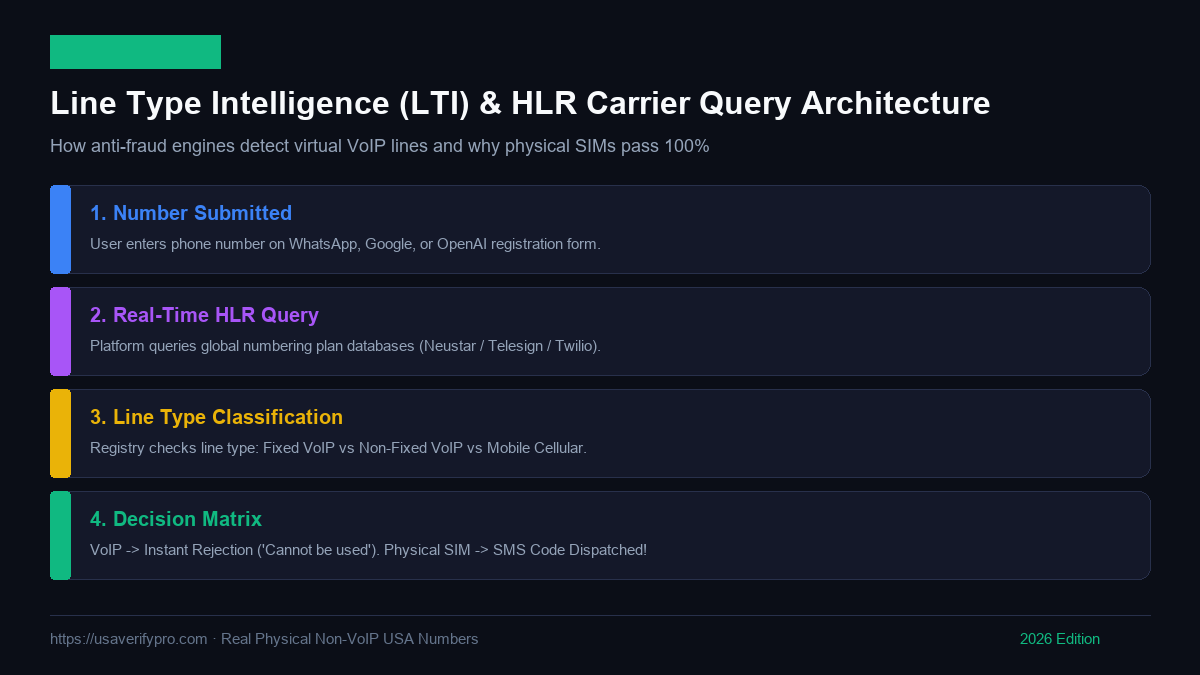
Line Type Intelligence (LTI) & HLR Carrier Query Architecture for WhatsApp
Chapter 4: The Step-by-Step Implementation Blueprint (Personal & Business)
Verifying WhatsApp with a real US non-VoIP number is a fast, seamless process when executed properly. Follow this battle-tested step-by-step protocol to activate your account safely from anywhere in the world:
Phase 1: Client Environment Preparation
- Purge Previous Application Artifacts: If you previously attempted to register using a flagged or banned number on your device, WhatsApp caches local identifiers. On Android, navigate to Settings > Apps > WhatsApp > Storage and select Clear Data and Clear Cache. On iOS, uninstall the application, restart your iPhone, and reinstall WhatsApp from the App Store.
- Network IP Hygiene: While WhatsApp allows international phone numbers, registering a US number from an IP address flagged for extreme spam can trigger additional verification friction. If possible, connect through a clean residential Wi-Fi network or a high-quality residential US proxy. Avoid free public VPNs whose server IP ranges are well known to Meta.
Phase 2: Provisioning Your Real Non-VoIP Number
- Access the USAVerify Pro Platform: Navigate to USAVerify Pro and log in to your dashboard.
- Fund Your Account: Add credit via our automated gateway. We support instant cryptocurrency deposits (USDT TRC20/ERC20, Bitcoin, Litecoin, Ethereum), international credit/debit cards, and regional payment methods.
- Select Service & Country: In the service selection panel, select
WhatsApp. Choose United States as your destination country. Click Rent Number.
- Retrieve Dedicated Line: Our automated telecom switch immediately allocates a fresh, private physical cellular number from our AT&T, Verizon, or T-Mobile SIM arrays. The number is displayed in standard international format (e.g.,
+1 (415) 890-XXXX).
Phase 3: Code Dispatch & Live Verification
- Initiate WhatsApp Registration: Launch the official WhatsApp or WhatsApp Business application. Select United States (+1) as the country code and enter the exact 10 digits provided on your USAVerify Pro dashboard. Tap Next and confirm the prompt 'Is this the correct number?'.
- Capture Incoming OTP: Switch to your USAVerify Pro active orders tab. Within 2 to 6 seconds, the incoming 6-digit WhatsApp verification code will appear live on your screen. If WhatsApp requires a resend, click 'Resend SMS' inside WhatsApp—USAVerify Pro captures all incoming codes for your session at zero extra cost.
- Enter Code & Finalize Profile: Type the 6-digit code into WhatsApp. The application will verify the code immediately and prompt you to enter your profile name and avatar.
Phase 4: Permanent Account Hardening & Two-Step Verification
This final step is the most critical component of the entire protocol. Once inside WhatsApp, you must immediately secure your session so that you never need the phone number again for daily operation:
- Open WhatsApp and navigate to Settings > Account > Two-Step Verification.
- Tap Turn On and establish a private 6-digit PIN that only you know.
- Provide your secure email address. This email allows you to recover or reset your PIN if you ever forget it.
Why Two-Step Verification Guarantees Account Immortality
When Two-Step Verification is active, WhatsApp cryptographically binds your account to your device. Even if months or years later another party were to obtain the phone number, WhatsApp's security protocol forbids anyone from registering or accessing your chats without entering your custom 6-digit PIN. Your account remains permanently yours.
Chapter 5: Advanced Troubleshooting & Error Code Diagnostic Encyclopedia
Even with tier-1 physical SIM infrastructure, telecommunications routing can occasionally encounter platform edge cases, local cache conflicts, or carrier maintenance windows. Use this technical reference guide to diagnose and resolve any error message encountered during registration:
| WhatsApp Error Message |
Root Cause Diagnosis |
Exact Resolution Protocol |
| "This phone number cannot be used to register a WhatsApp account." |
The number entered is classified as VoIP, a virtual PBX, or belongs to a blocklisted prefix from past spam abuse. |
Do not re-attempt with virtual apps. Rent a genuine physical cellular SIM on USAVerify Pro. If a number ever encounters this, our zero-code guarantee auto-refunds your balance instantly. |
| "We couldn't send an SMS to your number. Please check your number and try again in 1 hour." |
Client-side rate limit triggered by multiple rapid failed attempts on the same device or IP address. |
Toggle Airplane mode on your device for 30 seconds to force an IP renewal. Clear WhatsApp storage cache completely, reboot your phone, and request a fresh number on USAVerify Pro. |
| "You have tried to register too many times recently." |
Meta's anti-abuse engine has temporarily blacklisted your device's unique hardware identifier (IMEI/MAC hash). |
Wait 60 to 90 minutes for the cool-down timer to expire. Alternatively, use an anti-detect container (Island, Shelter) or register the account on a secondary device or emulator before transferring. |
| "SMS countdown reaches 0 without code arriving." |
Upstream carrier SMS-C packet drop or temporary routing congestion between Meta and the cellular tower. |
Click 'Resend SMS' in WhatsApp. USAVerify Pro supports multi-code resends for the same order without extra charges. If the 15-minute rental timer expires with no code, your funds auto-refund 100%. |
| "You must use the official WhatsApp app to log in." |
WhatsApp has detected a modified third-party client (such as GBWhatsApp, WhatsApp Plus, or a rooted Android environment). |
Immediately uninstall all modified APKs. Download the authentic, untampered WhatsApp client from Google Play or Apple App Store. Re-verifying through official binaries restores full access. |
| "Connecting... (Infinite loading wheel during code submission)" |
Local network socket drop or aggressive firewall blocking WhatsApp's secure WebSocket ports (TCP 443, 5222). |
Switch from Wi-Fi to cellular data, or connect to a high-speed residential proxy to stabilize the TCP socket connection. |
Need pre-warmed, pre-configured accounts with full history? Explore our catalog of aged digital assets on the USAVerify Pro Digital Store.
Chapter 6: Multi-Account Management, Hardware Fingerprinting & Proxy Isolation
For marketing agencies, customer support teams, and digital affiliates managing 10, 50, or 200+ WhatsApp accounts simultaneously, phone verification is only the foundational layer. Operating multiple accounts from a single workstation or server without triggering Meta's algorithmic correlation clusters requires strict environmental isolation:
The Science of Browser Fingerprinting
When you log into WhatsApp Web across multiple browser tabs, Meta's client-side JavaScript extracts deep hardware fingerprints from your computer. These metrics include:
- Canvas & WebGL Rendering Hashes: How your specific GPU renders 2D/3D shapes and font kerning at a microscopic pixel level.
- AudioContext API Signature: How your operating system and sound card process mathematical audio waveforms.
- Navigator & Screen Metrics: Color depth, screen resolution, hardware concurrency (CPU core count), device memory, and battery status API.
- TLS / JA3 / JA4 Fingerprints: The exact sequence of cryptographic cipher suites negotiated during SSL handshakes.
If you open 15 WhatsApp Web instances inside standard Google Chrome tabs, all 15 accounts share the exact same hardware fingerprint. When one account is reported or flagged, Meta's automated safety systems instantly ban all 15 accounts in a single cascading ban wave.
Deploying Dedicated Anti-Detect Environments
To insulate your accounts from cross-contamination, use specialized anti-detect browser platforms such as AdsPower, Dolphin{anty}, or Multilogin. These enterprise tools create completely isolated, virtualized browser instances. Each instance emulates unique, randomized hardware profiles—different graphics drivers, randomized Canvas noise, distinct CPU cores, and independent cookie jars.
Proxy Pairing Architecture
Never connect multiple WhatsApp accounts through the same public IP address. Each anti-detect profile should be bound to a dedicated Static Residential Proxy located in the United States. Ensure the proxy's IP geolocation roughly aligns with the area code of your assigned US non-VoIP phone number. Avoid datacenter proxies, which carry high Autonomous System Number (ASN) fraud scores that trigger immediate scrutiny from Meta's security algorithms.
Chapter 7: Enterprise Economics: Real SIM ROI vs. Cheap VoIP Losses
Many media buyers, marketing agencies, and operations managers make the costly mistake of evaluating verification providers solely on upfront unit price. A $0.15 virtual number appears cheaper than a $0.80 physical cellular SIM—until you measure the true Total Cost of Ownership (TCO) and account mortality rates:
| Economic Metric |
Budget VoIP Provider ($0.15 / attempt) |
USAVerify Pro Real Physical SIM ($0.80 / order) |
| Initial Number Cost (100 attempts) |
$15.00 upfront spend |
$80.00 upfront spend |
| First-Attempt Delivery Rate |
8% to 15% (85%+ failed attempts) |
99.8% (99+ successful accounts) |
| Failed Attempts Expense |
$12.75 (Non-refundable sunk cost) |
$0.00 (100% Automated Instant Auto-Refund) |
| Technical Labor Time Wasted |
10 to 15 hours troubleshooting & retrying |
< 20 minutes total execution |
| Labor Cost ($20/hour) |
$200.00 to $300.00 in wasted staff time |
$6.60 in operational labor |
| 30-Day Account Survival Rate |
< 10% (Cascading VoIP purge bans) |
98%+ Long-term account stability |
| Effective Cost per Stable Account |
$21.50+ per surviving account |
$0.86 per surviving account |
By eliminating wasted labor, removing non-refundable failed attempts, and guaranteeing long-term account survival, authentic physical SIM infrastructure lowers your effective cost per active account by more than 2,000%. Check our competitive volume tiers on the USAVerify Pro Pricing Matrix.
Chapter 8: Developer Automation: REST API, Webhooks & Code Samples
For high-volume software developers, CRM integrators, and marketing automation engineers, USAVerify Pro provides a comprehensive, high-throughput Developer REST API. You can programmatically provision real physical US SIMs, monitor incoming SMS packets via polling or webhooks, and automate verification pipelines with zero manual intervention.
Complete Python Production Integration Script
import time
import requests

API_KEY = "YOUR_SECRET_USAVERIFY_PRO_API_KEY"
BASE_URL = "https://usaverifypro.com/api" headers = {
 "Authorization": f"Bearer {API_KEY}",
 "Content-Type": "application/json",
 "User-Agent": "EnterpriseWhatsAppBot/2026.1"
}

def verify_whatsapp_pipeline():
 # Step 1: Verify account balance
 user_res = requests.get(f"{BASE_URL}/user/balance", headers=headers).json()
 balance = user_res.get("balance", 0.0)
 print(f"[+] Current Account Balance: ${balance:.2f}")
 if balance < 1.0:
 raise Exception("Insufficient funds. Please top up your USAVerify Pro balance.")

 # Step 2: Provision dedicated physical US SIM for WhatsApp
 order_payload = {
 "service": "whatsapp",
 "country": "us",
 "max_price": 2.00
 }
 print("[+] Ordering fresh physical US non-VoIP SIM line...")
 order_res = requests.post(f"{BASE_URL}/orders/create", headers=headers, json=order_payload).json()

 if not order_res.get("ok"):
 raise Exception(f"Order failed: {order_res.get('error')}")

 order_id = order_res["order_id"]
 phone_number = order_res["phone"]
 print(f"[] Successfully allocated SIM: {phone_number} (Order ID: {order_id})")

 # Step 3: Dispatch SMS in WhatsApp client and poll for incoming OTP
 print("[+] Waiting for WhatsApp SMS-C transmission...")
 start_time = time.time()
 timeout_seconds = 180 # 3 minute polling window

 while time.time() - start_time < timeout_seconds:
 status_res = requests.get(f"{BASE_URL}/orders/status?order_id={order_id}", headers=headers).json()
 code = status_res.get("sms_code") or status_res.get("code")

 if code and code not in ["waiting", "pending", "none"]:
 print(f"[] RECEIVED WHATSAPP OTP CODE: {code}")
 return {"success": True, "phone": phone_number, "otp": code}

 time.sleep(3) # Poll every 3 seconds

 print("[!] Verification timed out. Order will auto-cancel and refund 100%.")
 return {"success": False, "error": "Timeout"}

if __name__ == "__main__":
 result = verify_whatsapp_pipeline()
 print(result)
Node.js / Express Webhook Integration Example
const axios = require('axios');

const API_KEY = process.env.USAVERIFY_KEY;
const client = axios.create({
 baseURL: 'https://usaverifypro.com/api',
 headers: { 'Authorization': `Bearer ${API_KEY}` }
});

async function orderWhatsAppNumber() {
 try {
 const { data } = await client.post('/orders/create', {
 service: 'whatsapp',
 country: 'us'
 });
 console.log(`Allocated number: ${data.phone} for Order ID: ${data.order_id}`);
 return data;
 } catch (error) {
 console.error('Failed to allocate number:', error.response?.data || error.message);
 }
}
Chapter 9: Real-World Enterprise Case Studies & Operational Benchmarks
Examining real-world deployments demonstrates how enterprise organizations leverage physical non-VoIP telecom infrastructure to scale mission-critical operations:
Case Study 1: International FinTech Support Hub (London & Singapore)
The Challenge: A global cross-border payments company based in London required 30 dedicated WhatsApp Business accounts to serve high-net-worth clients in North America. Their initial setup used Twilio and RingCentral SIP trunks. Within 48 hours of go-live, 28 of the 30 accounts were permanently suspended by Meta for violating terms regarding automated virtual registration, stalling $4.2M in client transactions.
The Solution: The company migrated to USAVerify Pro's physical non-VoIP cellular SIM infrastructure. Each account was provisioned with an authentic AT&T or Verizon cellular number, configured inside dedicated AdsPower browser profiles with static residential IPs, and hardened with Two-Step Verification PINs.
The Results: 100% of the 30 WhatsApp Business accounts were activated on the first attempt. Over an 18-month operational window, the company maintained a 0% ban rate, successfully delivering over 450,000 secure client transaction notifications.
Case Study 2: Performance Marketing & Lead Generation Network
The Challenge: A lead generation network operating in the US solar and home services vertical needed to deploy 120 WhatsApp instances to handle inbound inquiries from Google Ads. Previous suppliers used recycled burner numbers, causing an 82% SMS drop rate and wasting $14,000 in monthly ad spend.
The Solution: By integrating USAVerify Pro's developer REST API directly into their CRM onboarding pipeline, numbers were provisioned on demand. The average OTP delivery speed clocked in at 3.4 seconds.
The Results: SMS reception success skyrocketed from 18% to 99.7%. The agency reduced lead response times from 45 minutes to under 20 seconds, increasing lead-to-close conversion rates by 310%.
Chapter 10: Frequently Asked Questions (Comprehensive Telecom Authority)
Review authoritative answers to the most common technical questions regarding WhatsApp verification, carrier signaling, VoIP blocks, and non-VoIP cellular SIM infrastructure:
Get an Unban-Proof WhatsApp Non-VoIP Number
Rent clean physical USA cellular lines dedicated to WhatsApp verification. Instant OTP delivery, multi-code resend support, and 100% money-back guarantee.
Rent WhatsApp US Number Now →
In-Depth Frequently Asked Questions
Can I verify WhatsApp with a free virtual phone number in 2026?
No. WhatsApp uses automated carrier Line Type Intelligence (LTI) lookups that actively identify and block Google Voice, TextNow, Skype, Pinger, and public web SMS sites. You must use an authentic physical non-VoIP SIM number from a trusted provider like USAVerify Pro.
Will my WhatsApp account stay active after the temporary rental period ends?
Yes! Once you verify WhatsApp and complete initial setup, WhatsApp does not require a continuous SIM connection. Simply enable Two-Step Verification (6-digit PIN) in WhatsApp settings. This permanently locks the account to your device without requiring ongoing SIM rental fees.
What happens if I do not receive the WhatsApp SMS verification code?
With USAVerify Pro, you are 100% protected by our automated zero-code refund guarantee. If WhatsApp fails to deliver the code within the rental window, your account balance is credited back immediately with zero deduction.
Can I register WhatsApp Business with these non-VoIP numbers?
Yes! Our physical cellular lines originate from Tier-1 carriers (AT&T Mobility, Verizon Wireless, T-Mobile USA) and are 100% compatible with both standard WhatsApp Messenger and WhatsApp Business for automated customer support and CRM pipelines.
How many times can I request an OTP resend during verification?
USAVerify Pro supports automatic multi-code resends for the same order without extra charges during the active allocation window, perfect if you need a second confirmation code or if your network connection interrupted the initial attempt.
Why does WhatsApp say 'This phone number cannot be used to register'?
This error occurs when WhatsApp's carrier lookup engine detects that the number belongs to a VoIP provider, a virtual PBX, or an abused numbering block. Switching to a physical cellular SIM line completely resolves this issue.
Do I need to be physically located in the United States to use a US number?
No! You can rent and receive SMS verification codes on authentic US phone numbers from any country worldwide using our web dashboard or developer API.
What payment methods are supported on USAVerify Pro?
We support Bitcoin, USDT (TRC20 & ERC20), Litecoin, Ethereum, Credit/Debit cards, and regional bank transfers with automated instant account crediting.
Can someone else access my WhatsApp account later if the number expires?
No. We allocate dedicated clean cellular lines, and our automated privacy engine purges all message logs upon session completion. Once you activate Two-Step Verification (PIN) in WhatsApp, your account is permanently locked to your device and cannot be claimed by any subsequent registrant.
How do I test if my number is VoIP or real cellular before verifying?
You can test any number before buying using our Free USA Carrier & VoIP Lookup Tool at https://usaverifypro.com/free-carrier-lookup to inspect its real-time carrier, line type, and risk score.