You typed your phone number into PayPal, hit confirm, and got one of three things: an instant rejection, a code that never arrives, or a message saying your number "cannot be used for verification." If any of those sound familiar, this guide is for you.
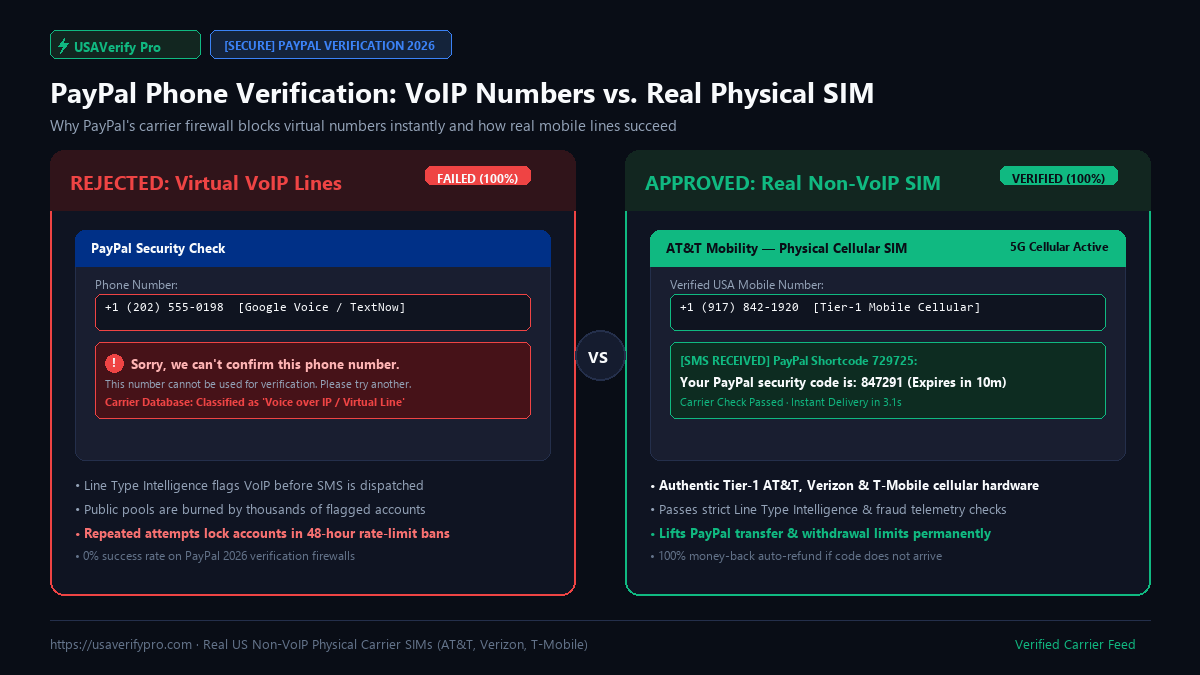
PayPal runs one of the strictest phone screening systems of any platform on the internet. In 2026 it no longer just checks whether a number looks valid — it queries carrier-level databases to determine whether your line is a physical mobile SIM or a virtual VoIP number. Free numbers from Google Voice, TextNow, and public SMS receive sites fail this check before an SMS is even sent.
The good news: the fix is cheap, fast, and takes about two minutes once you know what you're doing. Below is the complete playbook — why PayPal rejects numbers, which methods actually work in 2026, and a step-by-step walkthrough to get verified today.
Why PayPal Requires Phone Verification at All
PayPal is a money transmitter, which makes it a regulated financial institution in most markets. Its fraud systems are therefore closer to a bank's than a social app's. Phone verification serves three purposes:
- Account recovery. If you lose your password, the phone number is a second anchor for identity recovery alongside your email.
- Transaction authorization. High-risk transfers, new device logins, and unusual activity can trigger an SMS challenge before money moves.
- Sybil resistance. One person with one SIM card should equal one account. Virtual numbers break this assumption, so PayPal blocks them aggressively.
That third point is the one that bites most users. Because disposable VoIP numbers were abused for years to mass-create fake accounts, PayPal now treats "VoIP line" as a near-automatic fraud signal.
The Errors You'll See (and What Each One Really Means)
PayPal doesn't tell you the real reason your number was rejected — but each error message maps to a specific failure:
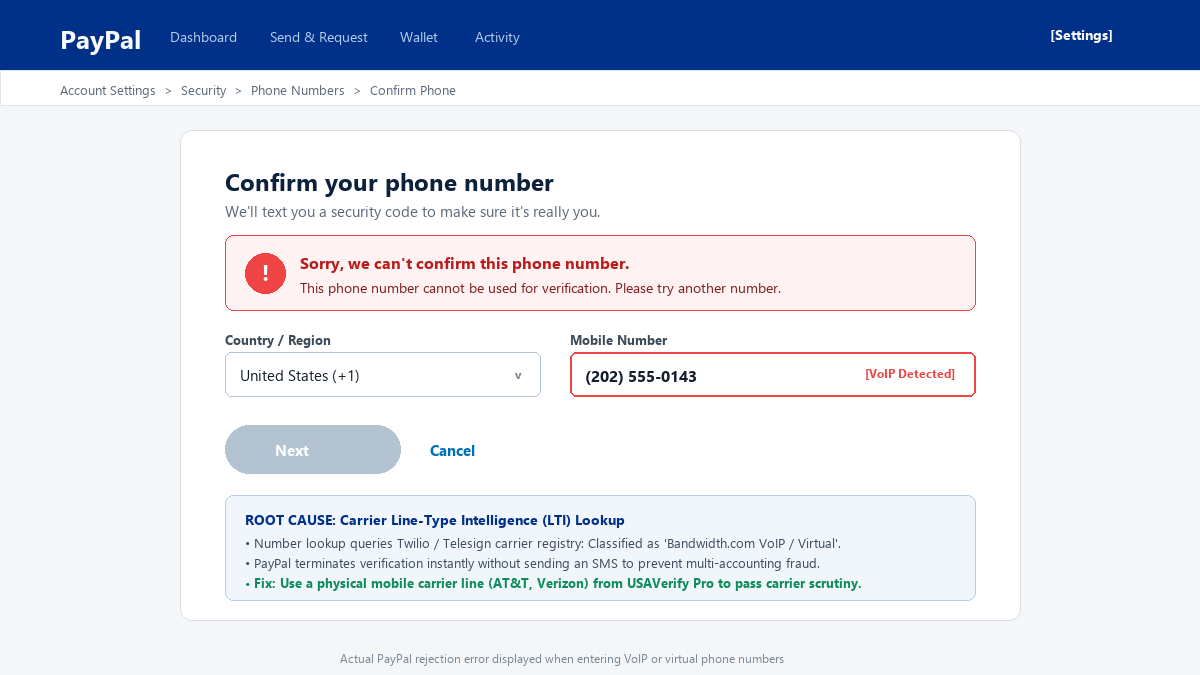
| Error message | Real cause | Fix |
|---|---|---|
| "Sorry, we can't confirm this phone number" | Number detected as VoIP / virtual / previously used | Use a real carrier line |
| "This phone number cannot be used for verification" | Number is on PayPal's internal blocklist | Fresh, clean non-VoIP line |
| Code sent but never arrives | VoIP provider blocks shortcode SMS, or line is overloaded | Physical SIM line with direct SMS routing |
| "You have tried too many times" | Rate limit from repeated failures | Wait 24–48h, then verify with a clean line on first attempt |
| Verification loop (asks again and again) | IP/behavior mismatch flagged the session | Stable IP, same session, fresh number |
- The only reliable method: a real US non-VoIP number
- Free tool: check if your number is Mobile or VoIP
- Other methods people try (and why most fail)
- Step-by-step: verify PayPal in under 5 minutes
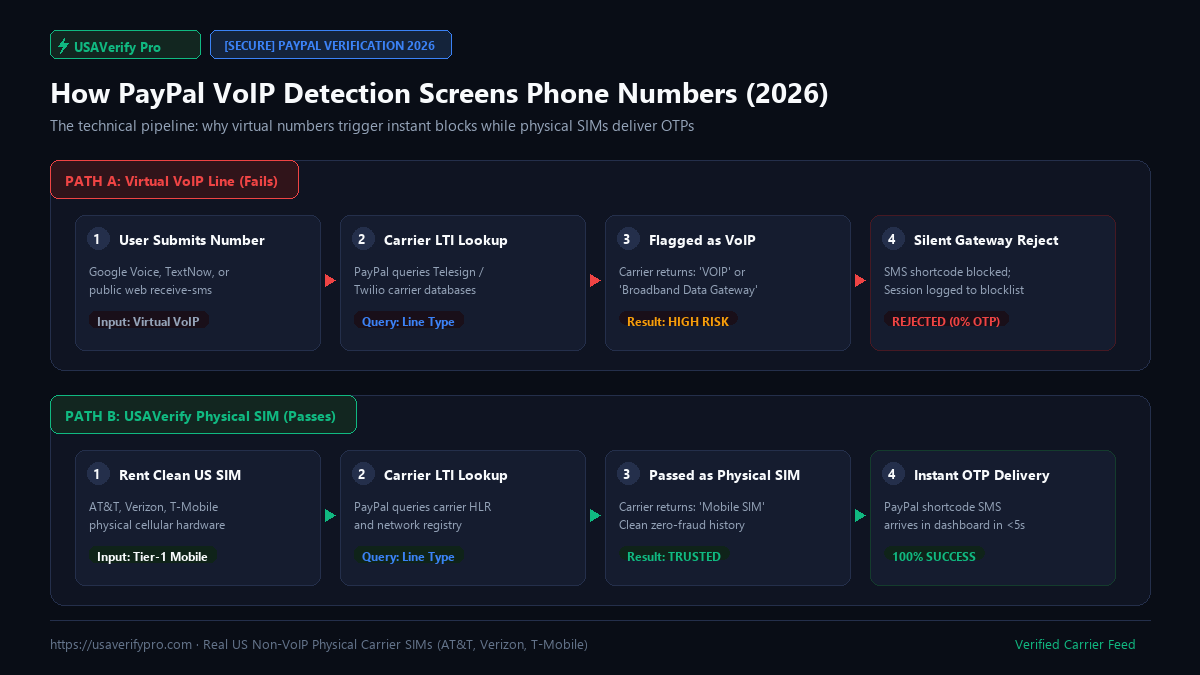
- How PayPal’s VoIP detection works
- Troubleshooting: SMS code not arriving
- Safety, privacy, and things to know
- Cost breakdown
- Frequently asked questions
The Only Method That Reliably Works: A Real US Non-VoIP Number
Everything else — free apps, public SMS sites, "virtual number" sellers — fails against PayPal's 2026 carrier checks. The method with a near-100% success rate is renting a genuine physical SIM line from a Tier-1 US carrier (AT&T, Verizon, or T-Mobile).
These are real mobile subscriptions sitting in carrier hardware. To PayPal's verification system, they are indistinguishable from the phone in any American's pocket, because at the network level, that is literally what they are.
This is the service USAVerify Real US SIM Service was built around: instant rental of physical US lines, with the OTP delivered to your dashboard in under 5 seconds and an automatic refund if no code arrives.
Why rental beats every alternative
Free Tool: Check Whether Your Number Is Mobile or VoIP
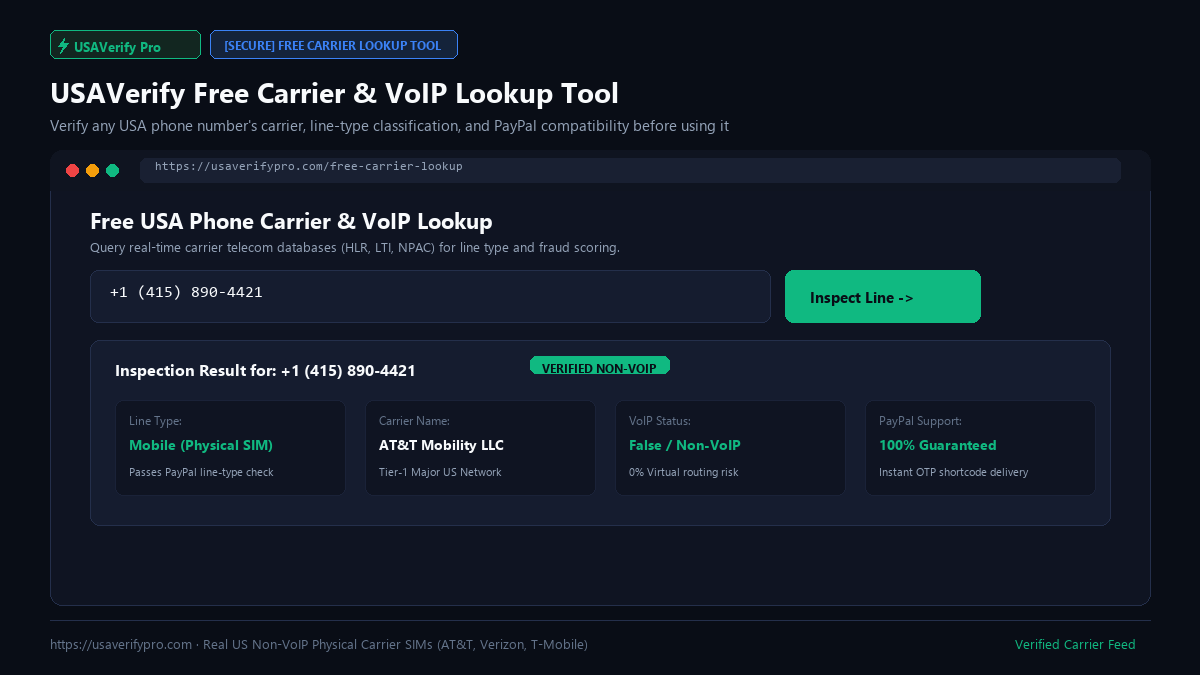
Before spending anything, run your number through a carrier lookup. It queries line-type databases and tells you exactly how PayPal sees it: Mobile (physical SIM), VoIP, or Landline.
USAVerify offers this as a free online tool — paste any US number and get the line type plus carrier instantly: Free USA Carrier & VoIP Lookup Tool →.
Other Methods People Try (and Why Most Fail in 2026)
| Method | Success rate on PayPal | Verdict |
|---|---|---|
| Google Voice | ~1% — flagged as VoIP instantly | Don't bother |
| TextNow / TextFree | <1% — on VoIP blocklists for years | Don't bother |
| Public SMS receive sites | <1% — numbers burned by thousands of users | Security risk + useless |
| Skype / other app numbers | <1% — classified as VoIP at carrier level | Don't bother |
| Friend's US SIM | High — if they share the code with you | Works, but you depend on them forever |
| Your own foreign SIM | Mixed — depends on account type and region | Often triggers re-verification loops |
| Rented non-VoIP line | ~100% — genuine carrier identity | The reliable choice |
The pattern is clear: anything classified "VoIP" by carrier databases is dead on arrival. The only two reliable options are borrowing a real US SIM or renting one — and renting is the only option where you're not depending on someone's goodwill every time PayPal sends a code.
Step-by-Step: Verify PayPal in Under 5 Minutes
Here's the complete walkthrough using a rented non-VoIP line:
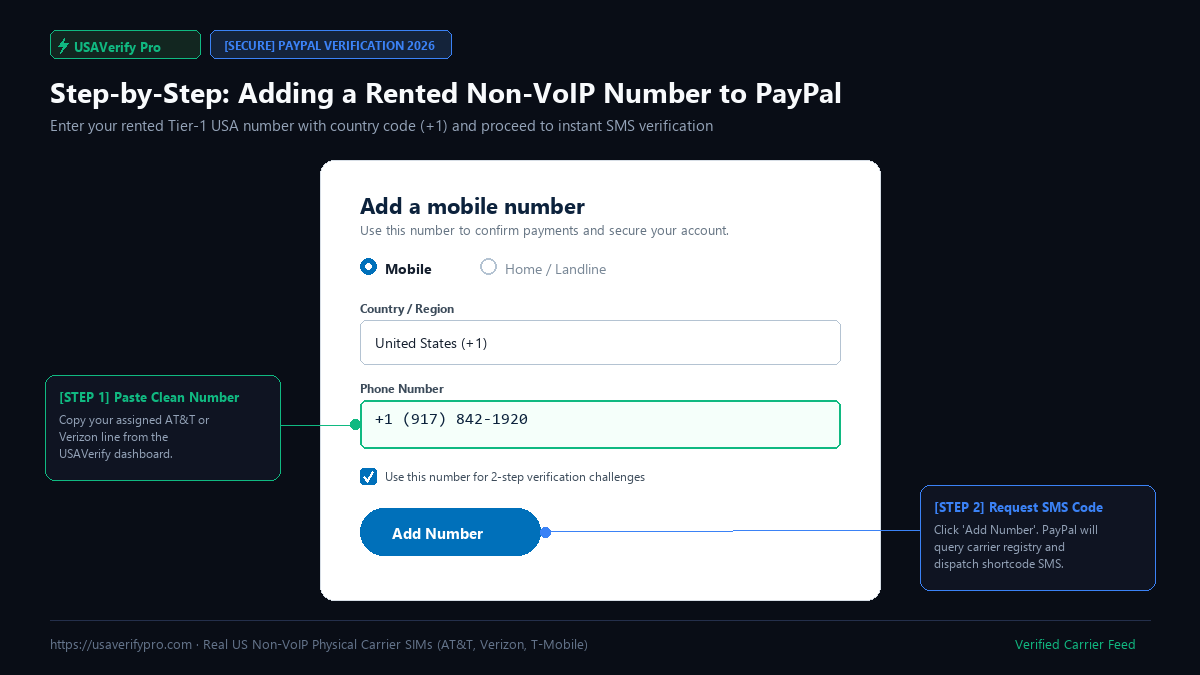
Step 1 — Create your account and top up
Sign up on the verification service (email only, no KYC), then deposit funds. Crypto options like USDT and Bitcoin are standard; amounts as low as $5 cover a dozen verifications.
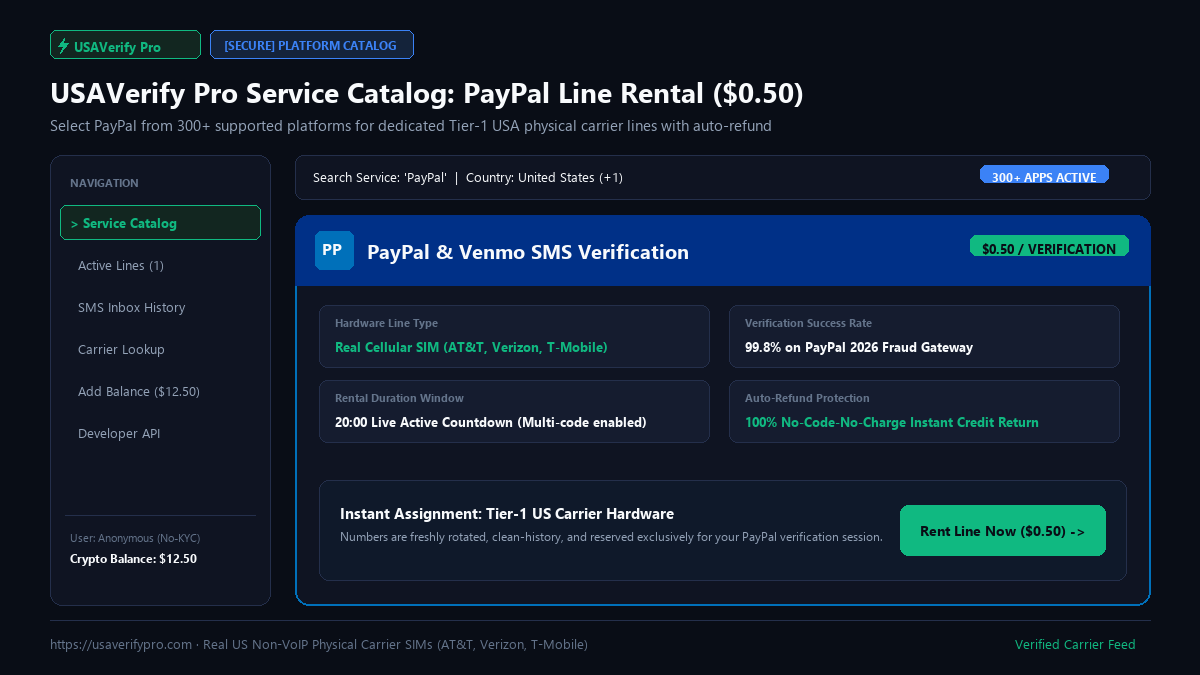
Step 2 — Select PayPal from the service catalog
Choose PayPal from the list of 300+ supported platforms. The system assigns you a fresh physical line from AT&T, Verizon, or T-Mobile and displays it with a live countdown timer.
Step 3 — Copy the number into PayPal exactly
Include the +1 country code. Paste it into PayPal's phone field, request the code, then watch the rental dashboard. The OTP typically lands in under 5 seconds.
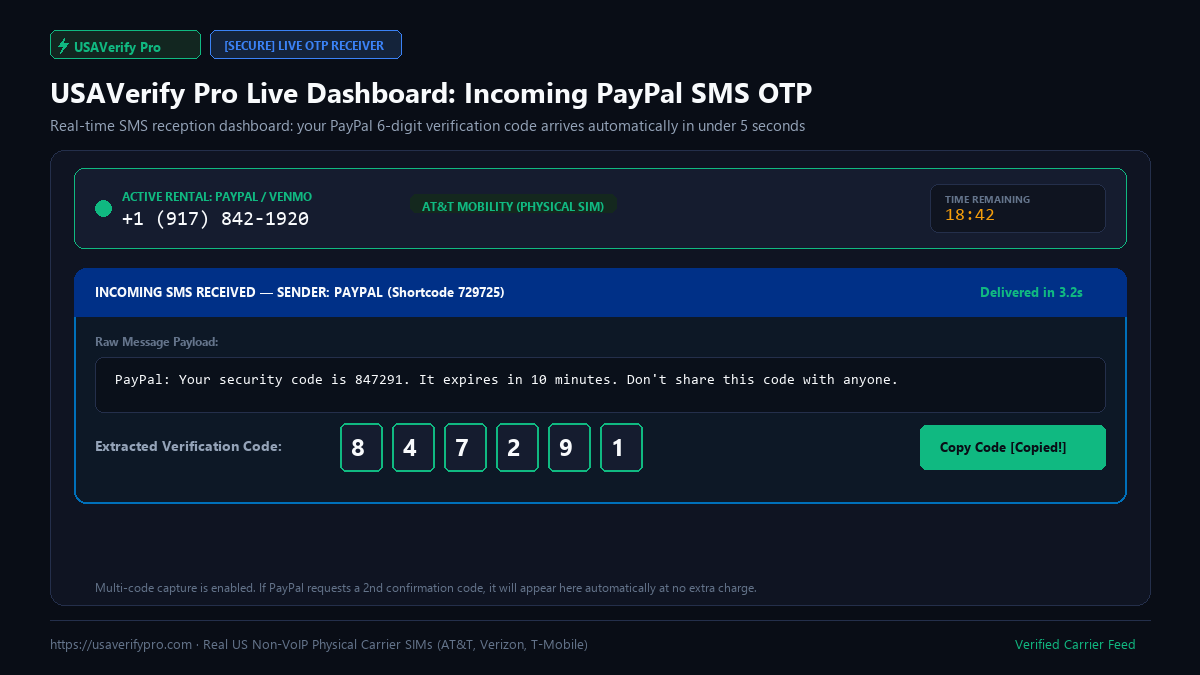
Step 4 — Enter the code in PayPal
Type the 6-digit code into PayPal. The number is now attached to your account and verified.
Step 5 — Keep the line for re-verification
PayPal re-challenges phone verification on new devices, password resets, and flagged transactions. If you rent with a longer session (or multi-code support), the same line keeps answering these prompts. Dropping the number after day one is the most common cause of lockouts weeks later.
Troubleshooting: When the SMS Code Doesn't Arrive
Even good lines occasionally hiccup. Work through this checklist in order:
- Wait 60 seconds, then resend once. Carrier congestion delays happen.
- Check the format. Number entered with +1 and no typos?
- Watch the dashboard, not your phone. The SMS routes to your rental dashboard, not a physical handset.
- Check the countdown. If the rental window expired, the line was released — rent a fresh one.
- If still nothing: take the refund. On a no-code-no-charge service, the failed rental auto-refunds. Don't retry the same line — grab a new one and try once more.
Safety, Privacy, and Things to Know
Is renting a number for PayPal legitimate?
Using a real mobile number you control is materially different from using disposable virtual numbers — the line itself is a genuine carrier subscription. The bigger risk factors are behavioral: logging in from five countries in a day, mismatched name/address data, or linking cards that don't match. A stable setup (consistent IP, consistent device, one trusted number) matters more than anything else for account health.
Privacy
Choose a provider that requires no KYC and encrypts account data. Your verification number should never be tied to your real identity anywhere on the provider's side.
Never verify with public shared numbers
Public SMS sites show every received code to the entire internet. Anyone watching can hijack your PayPal account the moment your code appears. This is not a theoretical risk — it is how these accounts get stolen.
Cost Breakdown
| Item | Cost |
|---|---|
| Single PayPal verification (non-VoIP rental) | from $0.50 |
| Minimum deposit (crypto) | ~$5 |
| Failed delivery | $0 (auto-refund) |
| Extended rental for ongoing 2FA | $1–3 depending on duration |
| Free carrier lookup to test any number | $0 |
See live rates for all platforms on the USAVerify pricing page — one balance works across PayPal, WhatsApp, Telegram, Google, and 300+ other services.
How PayPal's VoIP Detection Actually Works (and Why It Never Misses Free Numbers)
Understanding the detection mechanism explains why every "free number trick" you've seen on YouTube or Reddit stopped working years ago. PayPal doesn't maintain its own secret list of bad numbers. Instead, it queries the same industry databases that banks, insurers, and law enforcement use — most notably carrier line-type registries maintained at the network level.
Here's the critical detail most people miss: VoIP status is a property of the line itself, not of the app you use it through. A Google Voice number is VoIP because the number block was allocated to a VoIP carrier by the North American Numbering Plan administrator. No setting, VPN, or app change alters that registration. When PayPal's system looks up the number, the carrier database replies "Voice over IP" before a single SMS is transmitted — which is why you get an instant rejection rather than a code that never arrives.
This also explains a common frustration: numbers that worked in 2023 or 2024 suddenly fail in 2026. As abuse patterns shifted, carriers reclassified large blocks of numbers, and platforms tightened their thresholds. A number that passed last year may be sitting in a blocklist today. There is no public way to check PayPal's internal list — but the carrier lookup gives you the line type, which is the single variable that matters.
The three layers of screening
A rented non-VoIP line solves layers 1 and 2 by design — it's a mobile line with clean history. Layer 3 is on you: verify from a stable connection, ideally the same device and network you'll use for the account long-term.
International Users: The Real-World Verification Scenario
Here's the situation that generates the majority of "PayPal phone verification not working" searches: you're a freelancer in Dhaka, Lagos, Karachi, or São Paulo, and a client insists on paying via PayPal. You create the account, and within the first week PayPal asks for a US phone number to lift sending limits or confirm a new device.
Your local SIM is a genuine mobile line, and sometimes it works — but PayPal's US-centric risk engine treats foreign numbers inconsistently, especially for accounts with US-facing activity. Users report three recurring failure patterns with non-US numbers:
- The silent rejection. The number is accepted in the settings page, but verification codes simply never arrive — foreign carriers often drop shortcode SMS from US services silently, with no error on either end.
- The verification loop. The code arrives, you enter it, and PayPal asks again — a symptom of the system partially accepting the line but downgrading the session's trust score.
- The re-challenge cascade. Weeks later, a new device login triggers phone verification again, and by then you no longer have the same SIM active.
A dedicated rented US line attached permanently to the account eliminates all three patterns. It behaves exactly like the number of a US-based user — because at the carrier level, it is.
Personal vs Business Accounts: Different Verification Pressure
Not all PayPal accounts face the same scrutiny. Knowing where your account sits helps you plan the verification strategy before you're forced into it mid-transaction.
| Account state | Phone pressure | Recommended approach |
|---|---|---|
| Fresh personal account | Phone required at signup or first login | Verify immediately with a clean line — first-day trust building matters |
| Personal with bank/card linked | Occasional 2FA prompts | Keep the same number active long-term |
| Seller / receiving payments | Phone + escalating identity checks | Dedicated line you control, plus consistent device/IP usage |
| Business account | Strictest — phone tied to business profile | Longest available rental session; never share the line across accounts |
The golden rule: one number, one account, forever. Swapping numbers repeatedly is itself a risk signal. Whatever line you verify with, plan to keep answering codes on it for the life of the account.
The "Free Number" Trap: What It Actually Costs You
It's worth being blunt about the economics, because "free" numbers are the most expensive option in disguise. Consider what happens with a public SMS receive site:
- Account theft is trivial. Your PayPal code appears on a public page visible to anyone, including automated scrapers. Within seconds of your code posting, an attacker who watched the same number can attempt recovery flows.
- The number is pre-burned. Thousands of users before you tried the same number on PayPal. It sits on blocklists at layers 1 and 2 — you're attempting verification with the single worst possible line.
- You train PayPal to distrust you. Each failed attempt nudges your account's fraud score upward, raising the chance that your next verification — even a legitimate one — gets manual review.
- You lose the time anyway. Twenty minutes of trying free numbers, waiting for codes, and refreshing pages costs more than the $0.50 that solves the problem in two minutes.
The same logic applies to free trial tiers of VoIP apps. Even when the app doesn't charge you, the number block is registered as VoIP, and PayPal's layer-1 lookup rejects it before cost ever enters the equation. Free isn't a price tier in this market — it's a category of number that no longer exists in PayPal's accepted set.
Keeping Your Verified Account Healthy After Verification
Getting the green checkmark is the start, not the finish. PayPal re-evaluates accounts continuously, and these post-verification habits protect the investment you just made:
What Changed Between 2024 and 2026 (And Why Old Guides Are Wrong)
If you read a verification guide from 2024, throw it out. Three shifts rewrote the rules:
- Carrier reclassification swept the free-number market. In 2025, major US carriers reclassified millions of numbers that had quietly been VoIP all along but were treated as mobile by older databases. Numbers that "worked before" started failing overnight — which is why so many Reddit threads from that era read like glitch reports.
- PayPal moved verification earlier in the funnel. Where phone confirmation used to appear at withdrawal time, it's now frequently demanded at signup or first login. Waiting to "deal with it later" is no longer an option.
- Shortcode SMS routing tightened. Virtual carriers increasingly block or drop shortcode messages (the 5-6 digit senders services like PayPal use). Even numbers that pass line-type checks can silently lose codes in transit — another reason direct Tier-1 carrier routing matters.
The practical takeaway: freshness is part of correctness in this niche. Any guide older than about 12 months — including parts of this one, eventually — should be re-validated before you rely on it.
Frequently Asked Questions
Why does PayPal say my phone number cannot be used for verification?
Your number was flagged as VoIP, virtual, or previously used on a banned account. PayPal checks the carrier type behind every number, not just its format. The fix is a genuine mobile carrier line.
Can I verify PayPal with Google Voice or TextNow?
Almost never in 2026. Both are instantly recognized as VoIP and rejected before an SMS is even attempted.
How much does PayPal verification cost?
A rented real US non-VoIP line starts at $0.50 for a single verification, with automatic refund if the code never arrives.
I'm outside the US — can I still verify?
Yes. Renting a US line remotely is the standard method for international users. The OTP arrives in your online dashboard, so you never need physical access to a US phone.
What if the SMS code never arrives?
Resend once after 60 seconds. If still nothing and the rental window expires, a no-code-no-charge service refunds you automatically — rent a fresh line and retry.
Is a rented number safe for PayPal?
A physical SIM line is indistinguishable from any regular subscriber line to PayPal's systems. Account health depends more on stable login behavior than on where the number came from.
Can I reuse the number if PayPal asks again later?
Yes — keep the rental active with multi-code support so the same line can answer future 2FA prompts, password resets, and device challenges.
Will PayPal ban my account for using a rented number?
Risk comes from behavioral red flags (rapid IP changes, mismatched data), not from the line type — a real carrier number passes the same checks as anyone's personal phone.
Resellers and High-Volume Users: The API Route
If you're managing verification at scale — an agency onboarding clients, a support operation, or a reseller serving your own customers — the manual dashboard workflow becomes the bottleneck. This is where the REST API becomes relevant: programmatic number rental, status polling, and automatic refunds, so verification slots into your own software instead of a browser tab.
Two operational rules matter more at volume than anywhere else. First, rotate numbers aggressively — never let one line accumulate verification history across many unrelated accounts, since PayPal's graph analysis links accounts through shared contact points. Second, let the refund logic run automatically — at scale, failed deliveries are a statistical certainty, and a no-code-no-charge policy turns them from losses into free retries.
Does PayPal accept non-US numbers for verification?
Sometimes, but inconsistently. Foreign mobile numbers pass the line-type check yet still trigger silent failures or re-verification loops because of shortcode routing and regional risk scoring. Users with ongoing US-facing activity get the most stable results from a dedicated US line.
Can I verify PayPal without any phone number at all?
Not for a fully functional account. PayPal requires a confirmed phone number to lift sending and withdrawal limits. Workarounds that skip it leave you with a permanently restricted account that can receive but not spend — fine for a one-off payment, useless as an account.
How long does a rented number stay active?
Standard rentals last 20 minutes — enough for one verification. Extended sessions run hours to days, and some providers let you hold a number long-term for ongoing 2FA. For PayPal, where re-challenges arrive unpredictably, the longer session is usually worth the small extra cost.
What happens to my account if the rented number expires?
Nothing immediately — the verified number stays attached. The risk appears at the next verification challenge: if the line is gone, you must add a new number, and number churn is a risk signal. Keeping the line active avoids the problem entirely.
Bottom Line
PayPal phone verification in 2026 comes down to one fact: VoIP is dead, physical SIMs win. Every free method fails at the carrier lookup stage before an SMS is even sent, while a rented non-VoIP line from AT&T, Verizon, or T-Mobile passes in seconds — for less than the price of a coffee.
If your number was rejected, don't keep hammering PayPal's rate limiter. Wait out the cooldown, get a clean line, and verify on the first attempt.
Ready to Verify Your PayPal Account Without Rejection?
Stop wasting time with burned VoIP numbers. Rent a 100% authentic physical AT&T, Verizon, or T-Mobile SIM line with automated refund protection.
✓ Real Cellular Carrier SIMs · ✓ Instant Auto-Refund if Code Fails · ✓ No KYC Required